

The Showdown: Copilot vs ChatGPT
Both Microsoft Copilot and ChatGPT are powered by variants of OpenAI's GPT-4 architecture, but that's where the similarity ends. Microsoft has embedded Copilot deep into its Office suite, while OpenAI has built ChatGPT into a best-in-class web and mobile experience. The real question isn't which is "better"—it's which fits your workflow.
After testing both extensively for writing, coding, research, and Microsoft 365 integration, the choice comes down to your ecosystem lock-in and needs. If you live in Word, Excel, Teams, and Outlook daily, Copilot is a genuine force multiplier. If you want the most capable standalone AI assistant, ChatGPT remains unmatched.
The Core Difference: Ecosystem vs Standalone
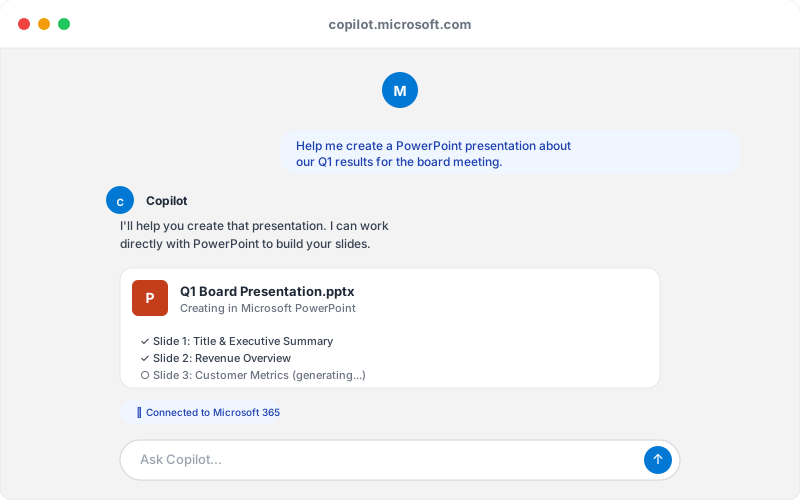
This is the fundamental split. Microsoft Copilot is Microsoft's answer to the question: "How do we inject AI into everything we already sell?" It lives inside your productivity tools. Copilot in Word rewrites your draft in real-time. Copilot in Excel generates formulas from plain English. Copilot in Teams surfaces key meeting points.
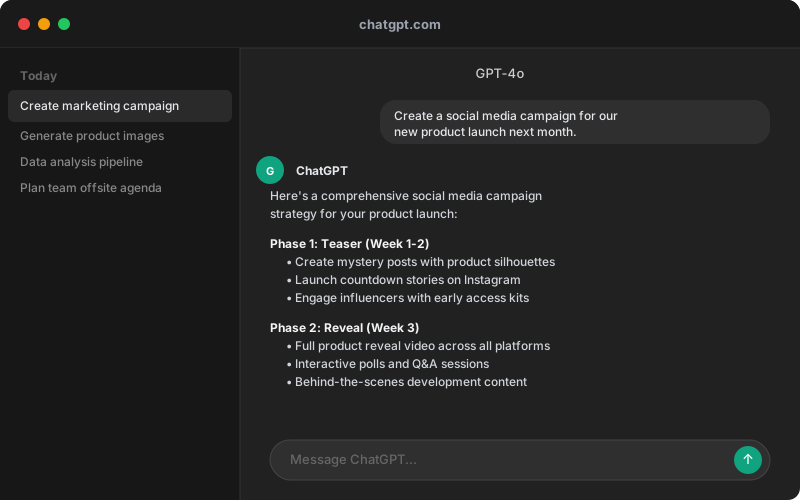
ChatGPT is the opposite philosophy: a best-in-class AI assistant that you visit (on the web, in apps, via API) when you need it. It doesn't pretend to be your email client or spreadsheet. It's purely focused on being excellent at understanding and generating text.
This design difference matters. Copilot's integration is genuinely useful if you're already in Microsoft's ecosystem—it saves context switching. But if you're not? ChatGPT's standalone interface is cleaner, more flexible, and less dependent on corporate IT decisions.
Writing Quality: Creative vs Corporate
We tested both with the same writing prompts: a blog post intro, a product description, and a sales email.
ChatGPT produces more natural, varied prose. It takes creative risks. When asked for a blog opener, it gave us something with personality—not just competent, but engaging. For anything that requires voice, style, or originality, ChatGPT consistently outperformed Copilot.
Copilot writes like a very smart corporate memo writer. Structured, clear, professional—and slightly sterile. Its outputs are always safe, rarely surprising. When we asked it to rewrite the same blog intro, it smoothed out the personality in favor of clarity and SEO-friendliness. This isn't a bug if you're writing internal docs or business proposals. It's a feature.
For creative work, journalism, marketing copy, or anything that needs a distinct voice, ChatGPT wins decisively. For internal business writing or structured reports, Copilot's corporate tone might actually be preferable.
Microsoft 365 Integration: Copilot's Killer Feature
This is where Copilot genuinely shines and ChatGPT can't compete.
In Word, Copilot reads your document and offers real-time rewrites, summarization, and tone adjustment. In Excel, it generates formulas from descriptions ("give me revenue by region"). In PowerPoint, it creates entire slides from bullet points. In Outlook, it drafts replies based on email context. In Teams, it summarizes meetings and surfaces action items.
This in-context awareness is powerful. Copilot doesn't need you to copy-paste your document into a chat window—it's already there. The context window in M365 apps is tighter than the web version, but the friction is gone.
ChatGPT offers none of this. You can paste content into ChatGPT's web interface, sure, but that's manual, slower, and creates a fragmented workflow.
The catch: This integration only matters if you actually use Microsoft 365. If you're on Google Workspace, Notion, or other tools, Copilot becomes just another web AI—and a less polished one than ChatGPT's.
Coding & Technical Tasks: ChatGPT Dominates
ChatGPT's Code Interpreter gives it a decisive edge for technical work. You can upload files, write and execute code, test solutions, and iterate in real-time. ChatGPT can debug your Python script, optimize your SQL queries, or build a data visualization—all within the chat.
Copilot can discuss code, generate snippets, and explain functions. But it can't run code, test output, or provide interactive iteration. For developers, data scientists, and engineers, this is a material disadvantage.
ChatGPT also has a larger context window (up to 128K tokens vs Copilot's ~32K). For someone working with large codebases or lengthy documentation, this matters.
The secondary benefit: ChatGPT's plugin ecosystem includes code-specific tools, APIs, and integrations that developers rely on. Copilot's plugin story is limited to the Microsoft ecosystem.
Pricing Breakdown: Dead Heat at $20/mo
Both services offer a free tier, a $20/month Pro/Plus tier, and enterprise options. The free versions are genuinely useful—you get most core features. The paid tier is essentially the same price and gives you priority access, faster responses, and newer models.
Where they diverge:
- Microsoft 365 Copilot ($30/month add-on, on top of M365 subscription) is where Microsoft makes its real play. If you're already paying for Microsoft 365 Business Standard (~$12.50/user/month), adding Copilot Pro ($30/month) gets you AI across Office.
- ChatGPT Plus ($20/month standalone) has no prerequisite subscriptions.
For pure cost, ChatGPT is cheaper unless you're already in the Microsoft ecosystem, where M365 Copilot becomes the integrated option.
Free tiers: identical value. Both let you use the core model without limits on queries. ChatGPT free gets GPT-3.5; Copilot free gets older models. Upgrading either to Pro-level gets you GPT-4.
Who Should Choose Copilot?
Choose Copilot if:
- You use Microsoft Word, Excel, PowerPoint, and Outlook daily
- Your organization has Microsoft 365 licenses already in place
- You want AI embedded directly into your workflow, not as a separate tool
- You work on structured tasks: spreadsheets, reports, presentations
- Your company uses Teams for collaboration and wants Copilot in meetings
- You need Bing Search integration for real-time information
Copilot makes you faster at Microsoft tasks. But it only works if those are your primary tasks.
Who Should Choose ChatGPT?
Choose ChatGPT if:
- You need a versatile standalone AI assistant for any task
- You write creatively: essays, marketing copy, fiction, journalism
- You code and need Code Interpreter and debugging
- You use Google Workspace, Notion, or other non-Microsoft tools
- You want access to a wide plugin ecosystem
- You need the largest context window for long-form analysis
- You want more model options (GPT-4o, o1-preview, etc.)
ChatGPT is the generalist choice. It's not the best at everything, but it's excellent at nearly everything and the best at many things.
The Verdict
ChatGPT is the better standalone AI assistant. It produces more creative outputs, handles coding tasks that Copilot can't, and offers broader flexibility. For most users—writers, coders, researchers, anyone outside a Microsoft-only environment—ChatGPT delivers more value.
Copilot wins the integration game decisively. If you spend 8 hours a day in Word, Excel, and Teams, Copilot's embedded AI is a genuine productivity multiplier that ChatGPT can't match.
At the same $20/month price point, ChatGPT is the safer bet. At $30/month with Microsoft 365, Copilot becomes competitive only if you're genuinely using Office as your primary tool. And if you're not using Microsoft 365 at all, Copilot's free version is good but not better than ChatGPT's free offering.
The bottom line: Pick Copilot if you're entrenched in Microsoft 365. Pick ChatGPT for everything else. Both are powerful, but they're optimized for different workflows—and only one will save you real time.
Related Reading
- Claude as an alternative? Read our Claude vs ChatGPT comparison for another strong contender.
- Google's play: See how Gemini compares to ChatGPT.
- Free alternative: Check if DeepSeek can replace ChatGPT for your workflow.
- New to ChatGPT? Our complete beginner's guide to ChatGPT walks you through setup and tips.
- Exploring alternatives? See our best ChatGPT alternatives ranked and reviewed.
- Need AI for writing? Our best AI writing tools roundup covers the top options.